Wednesday, February 28, 2018

A Design Pyramid for WebApp

A Design Pyramid for WebApp

  • Introduction
  • The creation of an effective design will typically require a diverse set of skills.
  • Sometimes, for small projects, a single developer may need to be multi-skilled. 
  • For larger projects, it may be advisable and/or feasible to draw on the expertise of specialists:
    • Web engineers,
    • Graphic designers,
    • Content developers,
    • Programmers,
    • Database specialists,
    • Information architects, 
    • Network engineers,
    • Security experts,
    • Testers.
  • In Design pyramid for WebApps, each level of the pyramid represents a design action… 


A Design Pyramid for WebApp


Interface Design


  • Where am I? The interface should
    • provide an indication of the WebApp that has been accessed
    • Inform the user of location in the content hierarchy
  • What can I do now? The interface should always help the user understand his current options
    • what functions are available?
    • what links are live?
    • what content is relevant?
  • Where have I been, where am I going? The interface must facilitate navigation. 
    • Provide a “map” (implemented in a way that is easy to understand) of where the user has been and what paths may be taken to move elsewhere within the WebApp.


Aesthetic Design


  • Aesthetic design, also called graphic design.
  • Layout Issues :
    • Don’t be afraid of white space.
    • Emphasize content.
    • Organize layout elements from top-left to bottom right.
    • Group navigation, content, and function geographically within the page.
    • Don’t extend your real estate with the scrolling bar.
    • Consider resolution and browser window size when designing layout.


Content Design


  • Develops a design representation for content objects
    • For WebApps, a content object is more closely aligned with a data object for conventional software.
  • Represents the mechanisms required to instantiate their relationships to one another.
    • Analogous to the relationship between analysis classes and design components.
  • A content object has attributes that include content-specific information
  • Implementation-specific attributes that are specified as part of design


Architecture Design


  • Content architecture focuses on the manner in which content objects (or composite objects such as Web pages) are structured for presentation and navigation.
    • The term information architecture is also used to predict structures that lead to better organization, labeling, navigation, and searching of content objects.
  • WebApp architecture addresses the manner in which the application is structured to manage user interaction, handle internal processing tasks, effect navigation, and present content.
  • Architecture design is conducted in parallel with interface design, aesthetic design and content design.
  • Content architecture :
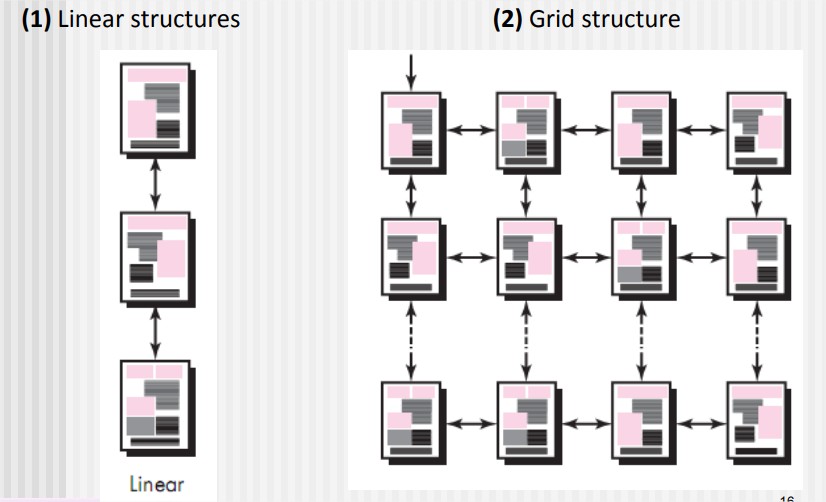
  • Four different content structures :
    • (1) Linear structures
      • (2) Grid structure
        • (3) Hierarchical structures
          • (4) Networked or “pure web” structure


Architecture Design, Linear structures, Grid structure


Hierarchical structures, Network structures


  • WebApp architecture
    • WebApp architecture describes an infrastructure that enables a Web-based system or application to achieve its business objectives.
  • The Model-View-Controller (MVC) architecture is one of a number of suggested WebApp infrastructure models that decouple the user interface from the WebApp functionality and informational content.

Model-View-Controller (MVC) architecture, WebApp architecture

Model-View-Controller (MVC) architecture


  • Model :
    • The model (sometimes referred to as the “model object”) contains all application-specific content and processing logic, including all content objects, access to external data/information sources, and all processing functionality that is application specific.
  • View :
    • The view contains all interface specific functions and enables the presentation of content and processing logic, including all content objects, access to external data/information sources, and all processing functionality required by the end user.
  • Controller :
    • The controller manages access to the model and the view and coordinates the flow of data between them. 


Navigation Design

  • Begins with a consideration of the user hierarchy and related use cases.
    • Each actor may use the WebApp somewhat differently and therefore have different navigation requirements
  • As each user interacts with the WebApp, it encounters a series of navigation semantic units (NSUs)
    • NSU—“a set of information and related navigation structures that collaborate in the fulfillment of a subset of related user requirements” 

Navigation Semantic Units

  • Navigation semantic unit
    • Ways of navigation (WoN)—represents the best navigation way or path for users with certain profiles to achieve their desired goal or sub-goal. Composed of …
    • Navigation nodes (NN) connected by Navigation links
Navigation Design, Navigation Semantic Units


Navigation Syntax

  • Individual navigation link—text-based links, icons, buttons and switches, and graphical metaphors..
  • Horizontal navigation bar—lists major content or functional categories in a bar containing appropriate links. 
  • Vertical navigation column
    • lists major content or functional categories
    • lists virtually all major content objects within the WebApp.
  • Sitemaps—provide an all-inclusive tab of contents for navigation to all content objects and functionality contained within the WebApp.

Component-Level Design

  • WebApp components implement the following functionality
    • Perform localized processing to generate content and navigation capability in a dynamic fashion
    • Provide computation or data processing capability that are appropriate for the WebApp’s business domain
    • Provide sophisticated database query and access
    • Data interfaces with external corporate systems. 

Monday, February 26, 2018

WebApp Design Goals

WebApp Design Goals


  • Introduction :
  • Jean Kaiser suggests a set of design goals that are applicable to virtually every WebApp regardless of application domain, size, or complexity.
  • The following are the set of design goals to apply webApp
    • Simplicity
    • Consistency
    • Identity
    • Robustness
    • Navigability
    • Visual Appeal 
    • Compatibility


  • Simplicity 
    • Content should be informative but to the point and should use a delivery mode (e.g., text, graphics, video, audio) that is appropriate to the information that is being delivered.
    • Architecture should achieve WebApp objectives in the simplest possible manner.
    • Navigation should be straightforward and navigation mechanisms should be naturally obvious to the end user.
    • Functions should be easy to use and easier to understand.
  • Consistency
    • This design goal applies to virtually every element of the design model.
    • Content should be constructed consistently
    • e.g., text formatting and font styles should be the same across all text documents;
    • Graphic art should have a consistent look, color scheme, and style)
  • Identity
    • Establish an “identity” that is appropriate for the business purpose.
  • Robustness (Strength)
    • The user expects robust content and functions that are relevant to the user’s needs.
  • Navigability
    • Navigation should be simple and consistent.
    • It should also be designed in a manner that is predictable.
    • The user should understand how to move about the WebApp without having to search for navigation links or instructions.
  • Visual appeal
    • The look and feel of content, interface layout, color coordination, the balance of text, graphics and other media, navigation mechanisms must appeal to end-users
  • Compatibility
    • WebApp will be used in a variety of environments (e.g., different hardware, Internet connection types, operating systems, browsers)
    • It must be designed to be compatible with each.


WebApp Design Quality

WebApp Design Quality


  • Introduction:
  • There are essentially two basic approaches to design:
    • The artistic ideal of expressing yourself
    • The engineering ideal of solving a problem for a customer.
  • Design is the engineering activity that leads to a high-quality product. This leads us to a recurring question that is encountered in all engineering disciplines: What is quality?

WebApp Design Quality

  • Some other quality attributes
  • Security
    • WebApps have become heavily integrated with critical corporate and government databases. E-commerce applications extract and then store sensitive customer information. 
    • Rebuff (Reject) external attacks
    • Exclude unauthorized access
    • Ensure the privacy of users/customers
  • Availability
    • The measure of the percentage of time that a WebApp is available for use.
  • Scalability
    • Can the WebApp and the systems with which it is interfaced handle significant variation in user or transaction volume… If numbers of users are extend…
  • Time to Market 
    • although time-to-market is not a true quality attribute in the technical sense, it is a measure of quality from a business point of view.

WebApp Design Patterns

WebApp Design Patterns


  • There are two dimensions in WebApp Design Patterns:
  • The design focus of the pattern and its level of granularity.
  • Design focus identifies which aspect of the design model is relevant (e.g., information architecture, navigation, interaction).
  • Granularity identifies the level of abstraction that is being considered (e.g., does the pattern apply to the entire WebApp, to a single Web page, to a subsystem, or an individual WebApp component?).

  • Design Focus 
  • WebApp patterns can be categorized using the following levels of design focus
    • Information architecture patterns relate to the overall structure of the information space, and the ways in which users will interact with the information. 
    • Navigation patterns define navigation link structures, such as hierarchies, rings, tours, and so on. 
    • Interaction patterns contribute to the design of the user interface.
    • Presentation patterns assist in the presentation of content as it is presented to the user via the interface.
    • Functional patterns define the workflows, behaviors, processing, communication, and other algorithmic elements within a WebApp.

  • Design Granularity: When a problem involves “big picture” issues, you should attempt to develop solutions (and use relevant patterns) that focus on the big picture. 
  • In terms of the level of granularity, patterns can be described at the following levels. 
    • Architectural patterns. This level of abstraction will typically relate to patterns that define the overall structure of the WebApp, indicate the relationships among different components. 
    • Design patterns. These address a specific element of the design such as an aggregation of components to solve some design problem, relationships among elements on a page, or the mechanisms for effecting component-to-component communication. 
    • Component patterns. This level of abstraction relates to individual small-scale elements of a WebApp.

User interface Design Patterns

User interface Design Patterns


  • Hundreds of user interface (UI) patterns have been proposed in recent years. 
  • Most fall within one of the following 10 categories of patterns
  • (1) Pattern: TopLevelNavigation 
    • Brief Description: Used when a site or application implements a number of major functions. Provides a top-level menu, often coupled with a logo or identifying graphic, that enables direct navigation to any of the system’s major functions. 
  • (2) Pattern: CardStack 
    • Brief Description: Used when a number of specific subfunctions or content categories related to a feature or function must be selected in random order. [e.g. DropDownList]
  • (3) Pattern: Fill-in-the-Blanks 
    • Brief description: Allow alphanumeric data to be entered in a “text box.” 
  • (4) Pattern: SortableTable
    • Brief description: Display a long list of records that can be sorted by electing a toggle mechanism for any column label. 
  • (5) Pattern: BreadCrumbs 
    • Brief description: Provides a full navigation path when the user is working with a complex hierarchy of pages or display screens. 
  • (6) Pattern: EditInPlace
    • Brief description: Provide simple text editing capability for certain types of content in the location that it is displayed.
  • (7)  Pattern: SimpleSearch 
    • Brief description: Provides the ability to search a website or persistent data source for a simple data item described by an alphanumeric string.
  • (8) Pattern: Wizard
    • Brief description: Takes the user through a complex task one step at a time, providing guidance for the completion of the task through a series of simple window displays.
  • (9) Pattern: ShoppingCart 
    • Brief description: Provides a list of items selected for purchase. 
  • (10) Pattern: ProgressIndicator 
    • Brief description: Provides an indication of progress when an operation takes longer than n seconds.

Component Level Design Patterns

Component Level Design Patterns


  • Component-level design patterns provide you with proven solutions that address one or more subproblems extracted from the requirements model. 
  • In many cases, design patterns of this type focus on some functional element of a system. 
  • For example: Searching is a very common problem, it should come as no surprise that there are many search-related patterns like… 
    • AdvancedSearch
    • HelpWizard
    • SearchArea
    • SearchTips
    • SearchResults
    • SearchBox

Wednesday, January 31, 2018

Architectural Pattern

Architectural Pattern 


  • Architectural patterns for software define a specific approach for handling some characteristic of the system.
  • Bosch and Booch define a number of architectural pattern domains.
  • Access control :
    • There are many situations in which access to data, features, and functionality delivered by an application is limited to specifically defined end users.
  • Concurrency :
    • There are a number of different ways in which an application can handle concurrency, and each can be presented by a different architectural pattern.
  • Distribution:  
    • The distribution problem addresses the manner in which systems or components within systems communicate with one another in a distributed environment.Twosubproblems are considered:
    • (1) the way in which entities connect to one another,
    •  For example The most common architectural pattern established to address the distribution problem is the Broker pattern. Abroker acts as a “middleman” between the client component and a server component. 
  •  Persistence
    •  Persistent data are stored in a database or file and may be read or modified by other processes at a later time. 
    • two architectural patterns areused to achieve persistence 
      • —A DatabaseManagementSystem 
      • --- Application LevelPersistence pattern that builds persistence features into the application architecture

Monday, January 29, 2018

Pattern-Based Design | Thinking in Patterns | Design Tasks

Pattern-Based Design


  • A software designer begins with a requirements model (either explicit or implied) that presents an abstract representation of the system. 
  • The requirements model describes the problem set, establishes the context.


Pattern-Based Design


Thinking in Patterns

Shalloway and Trott suggest the following approach that enables a designer to think in patterns: 
  • 1. Be sure you understand the big picture—the context in which the software to be built resides. The requirements model should communicate this to you. 
  • 2. Examining the big picture, extract the patterns that are present at that level of abstraction.
  • 3. Begin your design with ‘big picture’ patterns that establish a context for further design work. 
  • 4. “Work inward from the context” looking for patterns at lower levels of abstraction that contribute to the design solution. 
  • 5. Repeat steps 1 to 4 until the complete design is fleshed out. 
  • 6. Refine the design by adapting each pattern to the specifics of the software you’re trying to build.


Design Tasks

  • Examine the requirements model and develop a problem hierarchy. 
  • Determine if a reliable pattern language has been developed for the problem domain.
  • Beginning with a broad problem, determine whether one or more architectural patterns are available for it.
  • Using the collaborations provided for the architectural pattern, examine subsystem or component level problems and search for appropriate patterns to address them.
  • Repeat steps 2 through 5 until all broad problems have been addressed. 

Saturday, January 27, 2018

Design Patterns | Effective Patterns | Kinds (Types) of Patterns | Frameworks | Difference between design patterns and Frameworks | Describing a Pattern | Pattern Languages

 Design Patterns

  • Each of us has encountered a design problem and silently thought: I wonder if anyone has developed a solution to for this?
    • What if there was a standard way of describing a problem (so you could look it up), and an organized method for representing the solution to the problem?
  • Design patterns are a codified method for describing problems and their solution allows the software engineering community to capture design knowledge in a way that enables it to be reused.
  •  Each pattern describes a problem that occurs over and over again in our environment and then describes the core of the solution to that problem in such a way that you can use the solution a million times over without ever doing it the same way twice.
    • Christopher Alexander, 1977
  • “a three-part rule which expresses a relation between a certain context, a problem, and a solution.”

Effective Patterns

  • Coplien characterizes an effective design pattern in the following way:
    • It solves a problem: Patterns capture solutions, not just abstract principles or strategies. 
    • It is a proven concept: Patterns capture solutions with a track record, not theories. 
    • The solution isn't obvious (Clear): Many problem-solving techniques (such as software design paradigms or methods) try to derive solutions from first principles. 
    • It describes a relationship: Patterns don't just describe modules but describe deeper system structures and mechanisms. 
    • The pattern has a significant human component (minimize human intervention). All software serves human comfort or quality of life.

 Kinds (Types) of Patterns

  • Architectural patterns describe broad-based design problems that are solved using a structural approach. 
  • Data patterns describe recurring data-oriented problems and the data modeling solutions that can be used to solve them. 
  • Component patterns (also referred to as design patterns) address problems associated with the development of subsystems and components, the manner in which they communicate with one another, and their placement within a larger architecture.
  • Interface design patterns describe common user interface problems and their solution with a system of forces that includes the specific characteristics of end-users. 
  • WebApp patterns address a problem set that is encountered when building WebApps and often incorporates many of the other patterns categories just mentioned.
  • As per Gamma and his colleagues, focus on three types that are relevant to object oriented design :
  • Creational patterns focus on the “creation, composition, and representation of objects.
  • Structural patterns focus on problems and solutions associated with how classes and objects are organized and integrated to build a larger structure.
  • Behavioral patterns address problems associated with the assignment of responsibility between objects and the manner in which communication is effected between objects.

Frameworks

  • Patterns themselves may not be sufficient to develop a complete design.
    • In some cases, it may be necessary to provide an implementation- specific skeletal (Outline sketch) infrastructure, called a framework, for design work.
  • A framework is not an architectural pattern, but rather a skeleton with a collection of “plug points” (also called hooks and slots) that enable it to be adapted to a specific problem domain.
    • The plug points enable you to integrate problem specific classes or functionality within the skeleton. 
  • In object-oriented context, a framework is a collection of cooperating classes.

Difference between design patterns and Frameworks


Gamma and his colleagues describe the differences between design. patterns and frameworks in the following manner: 
  • 1. Design patterns are more abstract than frameworks. 
    • Frameworks can be in material form in code, but only examples of patterns can be embodied in code. 
    • A strength of frameworks is that they can be written down in programming languages and not only studied but executed and reused directly... 
  • 2. Design patterns are smaller architectural elements than frameworks.
    • A typical framework contains several design patterns but the reverse is never true. 
  • 3. Design patterns are less specialized than frameworks. 
    • Frameworks always have a particular application domain. In contrast, design patterns can be used in nearly any kind of application.

Describing a Pattern


  • Pattern name—describes the essence of the pattern in a short but expressive name
  • Problem—describes the problem that the pattern addresses 
  • Motivation—provides an example of the problem 
  • Context—describes the environment in which the problem resides including application domain 
  • Forces—lists the system of forces that affect the manner in which the problem must be solved; includes a discussion of limitation and constraints that must be considered 
  • Solution—provides a detailed description of the solution proposed for the problem 
  • Intent—describes the pattern and what it does 
  • Collaborations—describes how other patterns contribute to the solution 
  • Related patterns—cross-references related design patterns

Pattern Languages


  • A pattern language encompasses a collection of patterns 
    • each described using a standardized template. 
    • interrelated to show how these patterns collaborate to solve problems across an application domain. 
  • A pattern language is analogous to a hypertext instruction manual for problem-solving in a specific application domain. 
    • The problem domain under consideration is first described hierarchically, beginning with broad design problems associated with the domain and then refining each of the broad problems into lower levels of abstraction.

Wednesday, December 13, 2017

Design Evaluation Cycle

Design Evaluation Cycle


Introduction: Once you create an operational user interface prototype, it must be evaluated to determine whether it meets the needs of the user.

Design Evaluation Cycle