Showing posts with label Web App Design. Show all posts

Wednesday, February 28, 2018

A Design Pyramid for WebApp

A Design Pyramid for WebApp

  • Introduction
  • The creation of an effective design will typically require a diverse set of skills.
  • Sometimes, for small projects, a single developer may need to be multi-skilled. 
  • For larger projects, it may be advisable and/or feasible to draw on the expertise of specialists:
    • Web engineers,
    • Graphic designers,
    • Content developers,
    • Programmers,
    • Database specialists,
    • Information architects, 
    • Network engineers,
    • Security experts,
    • Testers.
  • In Design pyramid for WebApps, each level of the pyramid represents a design action… 


A Design Pyramid for WebApp


Interface Design


  • Where am I? The interface should
    • provide an indication of the WebApp that has been accessed
    • Inform the user of location in the content hierarchy
  • What can I do now? The interface should always help the user understand his current options
    • what functions are available?
    • what links are live?
    • what content is relevant?
  • Where have I been, where am I going? The interface must facilitate navigation. 
    • Provide a “map” (implemented in a way that is easy to understand) of where the user has been and what paths may be taken to move elsewhere within the WebApp.


Aesthetic Design


  • Aesthetic design, also called graphic design.
  • Layout Issues :
    • Don’t be afraid of white space.
    • Emphasize content.
    • Organize layout elements from top-left to bottom right.
    • Group navigation, content, and function geographically within the page.
    • Don’t extend your real estate with the scrolling bar.
    • Consider resolution and browser window size when designing layout.


Content Design


  • Develops a design representation for content objects
    • For WebApps, a content object is more closely aligned with a data object for conventional software.
  • Represents the mechanisms required to instantiate their relationships to one another.
    • Analogous to the relationship between analysis classes and design components.
  • A content object has attributes that include content-specific information
  • Implementation-specific attributes that are specified as part of design


Architecture Design


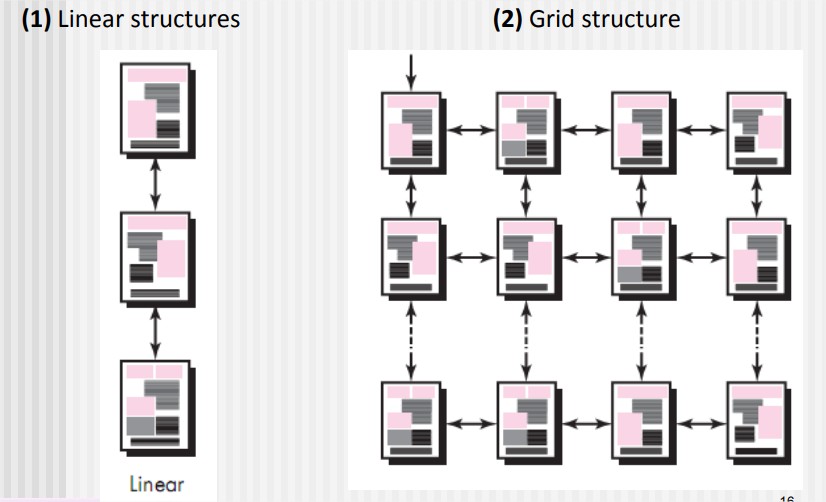
  • Content architecture focuses on the manner in which content objects (or composite objects such as Web pages) are structured for presentation and navigation.
    • The term information architecture is also used to predict structures that lead to better organization, labeling, navigation, and searching of content objects.
  • WebApp architecture addresses the manner in which the application is structured to manage user interaction, handle internal processing tasks, effect navigation, and present content.
  • Architecture design is conducted in parallel with interface design, aesthetic design and content design.
  • Content architecture :
  • Four different content structures :
    • (1) Linear structures
      • (2) Grid structure
        • (3) Hierarchical structures
          • (4) Networked or “pure web” structure


Architecture Design, Linear structures, Grid structure


Hierarchical structures, Network structures


  • WebApp architecture
    • WebApp architecture describes an infrastructure that enables a Web-based system or application to achieve its business objectives.
  • The Model-View-Controller (MVC) architecture is one of a number of suggested WebApp infrastructure models that decouple the user interface from the WebApp functionality and informational content.

Model-View-Controller (MVC) architecture, WebApp architecture

Model-View-Controller (MVC) architecture


  • Model :
    • The model (sometimes referred to as the “model object”) contains all application-specific content and processing logic, including all content objects, access to external data/information sources, and all processing functionality that is application specific.
  • View :
    • The view contains all interface specific functions and enables the presentation of content and processing logic, including all content objects, access to external data/information sources, and all processing functionality required by the end user.
  • Controller :
    • The controller manages access to the model and the view and coordinates the flow of data between them. 


Navigation Design

  • Begins with a consideration of the user hierarchy and related use cases.
    • Each actor may use the WebApp somewhat differently and therefore have different navigation requirements
  • As each user interacts with the WebApp, it encounters a series of navigation semantic units (NSUs)
    • NSU—“a set of information and related navigation structures that collaborate in the fulfillment of a subset of related user requirements” 

Navigation Semantic Units

  • Navigation semantic unit
    • Ways of navigation (WoN)—represents the best navigation way or path for users with certain profiles to achieve their desired goal or sub-goal. Composed of …
    • Navigation nodes (NN) connected by Navigation links
Navigation Design, Navigation Semantic Units


Navigation Syntax

  • Individual navigation link—text-based links, icons, buttons and switches, and graphical metaphors..
  • Horizontal navigation bar—lists major content or functional categories in a bar containing appropriate links. 
  • Vertical navigation column
    • lists major content or functional categories
    • lists virtually all major content objects within the WebApp.
  • Sitemaps—provide an all-inclusive tab of contents for navigation to all content objects and functionality contained within the WebApp.

Component-Level Design

  • WebApp components implement the following functionality
    • Perform localized processing to generate content and navigation capability in a dynamic fashion
    • Provide computation or data processing capability that are appropriate for the WebApp’s business domain
    • Provide sophisticated database query and access
    • Data interfaces with external corporate systems. 

Monday, February 26, 2018

WebApp Design Goals

WebApp Design Goals


  • Introduction :
  • Jean Kaiser suggests a set of design goals that are applicable to virtually every WebApp regardless of application domain, size, or complexity.
  • The following are the set of design goals to apply webApp
    • Simplicity
    • Consistency
    • Identity
    • Robustness
    • Navigability
    • Visual Appeal 
    • Compatibility


  • Simplicity 
    • Content should be informative but to the point and should use a delivery mode (e.g., text, graphics, video, audio) that is appropriate to the information that is being delivered.
    • Architecture should achieve WebApp objectives in the simplest possible manner.
    • Navigation should be straightforward and navigation mechanisms should be naturally obvious to the end user.
    • Functions should be easy to use and easier to understand.
  • Consistency
    • This design goal applies to virtually every element of the design model.
    • Content should be constructed consistently
    • e.g., text formatting and font styles should be the same across all text documents;
    • Graphic art should have a consistent look, color scheme, and style)
  • Identity
    • Establish an “identity” that is appropriate for the business purpose.
  • Robustness (Strength)
    • The user expects robust content and functions that are relevant to the user’s needs.
  • Navigability
    • Navigation should be simple and consistent.
    • It should also be designed in a manner that is predictable.
    • The user should understand how to move about the WebApp without having to search for navigation links or instructions.
  • Visual appeal
    • The look and feel of content, interface layout, color coordination, the balance of text, graphics and other media, navigation mechanisms must appeal to end-users
  • Compatibility
    • WebApp will be used in a variety of environments (e.g., different hardware, Internet connection types, operating systems, browsers)
    • It must be designed to be compatible with each.


WebApp Design Quality

WebApp Design Quality


  • Introduction:
  • There are essentially two basic approaches to design:
    • The artistic ideal of expressing yourself
    • The engineering ideal of solving a problem for a customer.
  • Design is the engineering activity that leads to a high-quality product. This leads us to a recurring question that is encountered in all engineering disciplines: What is quality?

WebApp Design Quality

  • Some other quality attributes
  • Security
    • WebApps have become heavily integrated with critical corporate and government databases. E-commerce applications extract and then store sensitive customer information. 
    • Rebuff (Reject) external attacks
    • Exclude unauthorized access
    • Ensure the privacy of users/customers
  • Availability
    • The measure of the percentage of time that a WebApp is available for use.
  • Scalability
    • Can the WebApp and the systems with which it is interfaced handle significant variation in user or transaction volume… If numbers of users are extend…
  • Time to Market 
    • although time-to-market is not a true quality attribute in the technical sense, it is a measure of quality from a business point of view.

WebApp Design Patterns

WebApp Design Patterns


  • There are two dimensions in WebApp Design Patterns:
  • The design focus of the pattern and its level of granularity.
  • Design focus identifies which aspect of the design model is relevant (e.g., information architecture, navigation, interaction).
  • Granularity identifies the level of abstraction that is being considered (e.g., does the pattern apply to the entire WebApp, to a single Web page, to a subsystem, or an individual WebApp component?).

  • Design Focus 
  • WebApp patterns can be categorized using the following levels of design focus
    • Information architecture patterns relate to the overall structure of the information space, and the ways in which users will interact with the information. 
    • Navigation patterns define navigation link structures, such as hierarchies, rings, tours, and so on. 
    • Interaction patterns contribute to the design of the user interface.
    • Presentation patterns assist in the presentation of content as it is presented to the user via the interface.
    • Functional patterns define the workflows, behaviors, processing, communication, and other algorithmic elements within a WebApp.

  • Design Granularity: When a problem involves “big picture” issues, you should attempt to develop solutions (and use relevant patterns) that focus on the big picture. 
  • In terms of the level of granularity, patterns can be described at the following levels. 
    • Architectural patterns. This level of abstraction will typically relate to patterns that define the overall structure of the WebApp, indicate the relationships among different components. 
    • Design patterns. These address a specific element of the design such as an aggregation of components to solve some design problem, relationships among elements on a page, or the mechanisms for effecting component-to-component communication. 
    • Component patterns. This level of abstraction relates to individual small-scale elements of a WebApp.

User interface Design Patterns

User interface Design Patterns


  • Hundreds of user interface (UI) patterns have been proposed in recent years. 
  • Most fall within one of the following 10 categories of patterns
  • (1) Pattern: TopLevelNavigation 
    • Brief Description: Used when a site or application implements a number of major functions. Provides a top-level menu, often coupled with a logo or identifying graphic, that enables direct navigation to any of the system’s major functions. 
  • (2) Pattern: CardStack 
    • Brief Description: Used when a number of specific subfunctions or content categories related to a feature or function must be selected in random order. [e.g. DropDownList]
  • (3) Pattern: Fill-in-the-Blanks 
    • Brief description: Allow alphanumeric data to be entered in a “text box.” 
  • (4) Pattern: SortableTable
    • Brief description: Display a long list of records that can be sorted by electing a toggle mechanism for any column label. 
  • (5) Pattern: BreadCrumbs 
    • Brief description: Provides a full navigation path when the user is working with a complex hierarchy of pages or display screens. 
  • (6) Pattern: EditInPlace
    • Brief description: Provide simple text editing capability for certain types of content in the location that it is displayed.
  • (7)  Pattern: SimpleSearch 
    • Brief description: Provides the ability to search a website or persistent data source for a simple data item described by an alphanumeric string.
  • (8) Pattern: Wizard
    • Brief description: Takes the user through a complex task one step at a time, providing guidance for the completion of the task through a series of simple window displays.
  • (9) Pattern: ShoppingCart 
    • Brief description: Provides a list of items selected for purchase. 
  • (10) Pattern: ProgressIndicator 
    • Brief description: Provides an indication of progress when an operation takes longer than n seconds.

Component Level Design Patterns

Component Level Design Patterns


  • Component-level design patterns provide you with proven solutions that address one or more subproblems extracted from the requirements model. 
  • In many cases, design patterns of this type focus on some functional element of a system. 
  • For example: Searching is a very common problem, it should come as no surprise that there are many search-related patterns like… 
    • AdvancedSearch
    • HelpWizard
    • SearchArea
    • SearchTips
    • SearchResults
    • SearchBox

Wednesday, January 31, 2018

Architectural Pattern

Architectural Pattern 


  • Architectural patterns for software define a specific approach for handling some characteristic of the system.
  • Bosch and Booch define a number of architectural pattern domains.
  • Access control :
    • There are many situations in which access to data, features, and functionality delivered by an application is limited to specifically defined end users.
  • Concurrency :
    • There are a number of different ways in which an application can handle concurrency, and each can be presented by a different architectural pattern.
  • Distribution:  
    • The distribution problem addresses the manner in which systems or components within systems communicate with one another in a distributed environment.Twosubproblems are considered:
    • (1) the way in which entities connect to one another,
    •  For example The most common architectural pattern established to address the distribution problem is the Broker pattern. Abroker acts as a “middleman” between the client component and a server component. 
  •  Persistence
    •  Persistent data are stored in a database or file and may be read or modified by other processes at a later time. 
    • two architectural patterns areused to achieve persistence 
      • —A DatabaseManagementSystem 
      • --- Application LevelPersistence pattern that builds persistence features into the application architecture

Monday, January 29, 2018

Pattern-Based Design | Thinking in Patterns | Design Tasks

Pattern-Based Design


  • A software designer begins with a requirements model (either explicit or implied) that presents an abstract representation of the system. 
  • The requirements model describes the problem set, establishes the context.


Pattern-Based Design


Thinking in Patterns

Shalloway and Trott suggest the following approach that enables a designer to think in patterns: 
  • 1. Be sure you understand the big picture—the context in which the software to be built resides. The requirements model should communicate this to you. 
  • 2. Examining the big picture, extract the patterns that are present at that level of abstraction.
  • 3. Begin your design with ‘big picture’ patterns that establish a context for further design work. 
  • 4. “Work inward from the context” looking for patterns at lower levels of abstraction that contribute to the design solution. 
  • 5. Repeat steps 1 to 4 until the complete design is fleshed out. 
  • 6. Refine the design by adapting each pattern to the specifics of the software you’re trying to build.


Design Tasks

  • Examine the requirements model and develop a problem hierarchy. 
  • Determine if a reliable pattern language has been developed for the problem domain.
  • Beginning with a broad problem, determine whether one or more architectural patterns are available for it.
  • Using the collaborations provided for the architectural pattern, examine subsystem or component level problems and search for appropriate patterns to address them.
  • Repeat steps 2 through 5 until all broad problems have been addressed. 

Saturday, January 27, 2018

Design Patterns | Effective Patterns | Kinds (Types) of Patterns | Frameworks | Difference between design patterns and Frameworks | Describing a Pattern | Pattern Languages

 Design Patterns

  • Each of us has encountered a design problem and silently thought: I wonder if anyone has developed a solution to for this?
    • What if there was a standard way of describing a problem (so you could look it up), and an organized method for representing the solution to the problem?
  • Design patterns are a codified method for describing problems and their solution allows the software engineering community to capture design knowledge in a way that enables it to be reused.
  •  Each pattern describes a problem that occurs over and over again in our environment and then describes the core of the solution to that problem in such a way that you can use the solution a million times over without ever doing it the same way twice.
    • Christopher Alexander, 1977
  • “a three-part rule which expresses a relation between a certain context, a problem, and a solution.”

Effective Patterns

  • Coplien characterizes an effective design pattern in the following way:
    • It solves a problem: Patterns capture solutions, not just abstract principles or strategies. 
    • It is a proven concept: Patterns capture solutions with a track record, not theories. 
    • The solution isn't obvious (Clear): Many problem-solving techniques (such as software design paradigms or methods) try to derive solutions from first principles. 
    • It describes a relationship: Patterns don't just describe modules but describe deeper system structures and mechanisms. 
    • The pattern has a significant human component (minimize human intervention). All software serves human comfort or quality of life.

 Kinds (Types) of Patterns

  • Architectural patterns describe broad-based design problems that are solved using a structural approach. 
  • Data patterns describe recurring data-oriented problems and the data modeling solutions that can be used to solve them. 
  • Component patterns (also referred to as design patterns) address problems associated with the development of subsystems and components, the manner in which they communicate with one another, and their placement within a larger architecture.
  • Interface design patterns describe common user interface problems and their solution with a system of forces that includes the specific characteristics of end-users. 
  • WebApp patterns address a problem set that is encountered when building WebApps and often incorporates many of the other patterns categories just mentioned.
  • As per Gamma and his colleagues, focus on three types that are relevant to object oriented design :
  • Creational patterns focus on the “creation, composition, and representation of objects.
  • Structural patterns focus on problems and solutions associated with how classes and objects are organized and integrated to build a larger structure.
  • Behavioral patterns address problems associated with the assignment of responsibility between objects and the manner in which communication is effected between objects.

Frameworks

  • Patterns themselves may not be sufficient to develop a complete design.
    • In some cases, it may be necessary to provide an implementation- specific skeletal (Outline sketch) infrastructure, called a framework, for design work.
  • A framework is not an architectural pattern, but rather a skeleton with a collection of “plug points” (also called hooks and slots) that enable it to be adapted to a specific problem domain.
    • The plug points enable you to integrate problem specific classes or functionality within the skeleton. 
  • In object-oriented context, a framework is a collection of cooperating classes.

Difference between design patterns and Frameworks


Gamma and his colleagues describe the differences between design. patterns and frameworks in the following manner: 
  • 1. Design patterns are more abstract than frameworks. 
    • Frameworks can be in material form in code, but only examples of patterns can be embodied in code. 
    • A strength of frameworks is that they can be written down in programming languages and not only studied but executed and reused directly... 
  • 2. Design patterns are smaller architectural elements than frameworks.
    • A typical framework contains several design patterns but the reverse is never true. 
  • 3. Design patterns are less specialized than frameworks. 
    • Frameworks always have a particular application domain. In contrast, design patterns can be used in nearly any kind of application.

Describing a Pattern


  • Pattern name—describes the essence of the pattern in a short but expressive name
  • Problem—describes the problem that the pattern addresses 
  • Motivation—provides an example of the problem 
  • Context—describes the environment in which the problem resides including application domain 
  • Forces—lists the system of forces that affect the manner in which the problem must be solved; includes a discussion of limitation and constraints that must be considered 
  • Solution—provides a detailed description of the solution proposed for the problem 
  • Intent—describes the pattern and what it does 
  • Collaborations—describes how other patterns contribute to the solution 
  • Related patterns—cross-references related design patterns

Pattern Languages


  • A pattern language encompasses a collection of patterns 
    • each described using a standardized template. 
    • interrelated to show how these patterns collaborate to solve problems across an application domain. 
  • A pattern language is analogous to a hypertext instruction manual for problem-solving in a specific application domain. 
    • The problem domain under consideration is first described hierarchically, beginning with broad design problems associated with the domain and then refining each of the broad problems into lower levels of abstraction.

Wednesday, December 13, 2017

Design Evaluation Cycle

Design Evaluation Cycle


Introduction: Once you create an operational user interface prototype, it must be evaluated to determine whether it meets the needs of the user.

Design Evaluation Cycle

Saturday, September 16, 2017

WebApp Interface Design | Interface Design Principles and Guidelines | Interface Design Workflow | Mapping User Objectives

WebApp Interface Design 

  • Introduction : WebApp interface design should be perfect so it answers three primary questions for the end user.
  • Where am I? The interface should 
    • provide an indication of the WebApp that has been accessed 
    • inform the user of her location in the content hierarchy.
  • What can I do now? The interface should always help the user understand his current options 
    • what functions are available? 
    • what links are live? 
    • what content is relevant? 
  • Where have I been, where am I going? The interface must facilitate navigation. Provide a "map".
  • An effective WebApp interface must provide answers for each of these questions as the end user navigates through content and functionality.

Interface Design Principles and Guidelines

  • Anticipation (Expectation) 
    • A WebApp should be designed so that it anticipates the user's next move. 
    • For example, consider a customer support WebApp developed by a manufacturer of computer printers. 
    • The designer of the WebApp should anticipate that the user might request a download of the driver and should provide navigation facilities that allow to download latest driver without searching. 
  • Communication
    • The interface should communicate the status of any activity initiated by the user. 
    • Communication can be obvious (e.g., a text message) or displaying a current location of page.
  • Consistency 
    • The use of navigation controls, menus, icons, and aesthetics (e.g., color, shape, layout) should be consistent throughout the WebApp. 
  • Controlled autonomy 
    • The interface should facilitate user movement throughout the WebApp, but it should be in a manner that enforces navigation conventions that have been established for the application. 
    • For example, navigation to secure portions of the WebApp should be controlled by userID and password.
  • Efficiency 
    • The design of the WebApp and its interface should optimize the user's work efficiency, not the efficiency of the developer who designs and builds it or the client server environment that executes it.
  • Flexibility 
    • The interface should be flexible enough to enable some users to accomplish tasks directly 
  • Focus 
    • The WebApp interface (and the content it presents) should stay focused on the user task(s) at hand. 
  • Fitt's Law 
    • "The time to acquire a target is a function of the distance to and size of the target."
  • Human interface objects
    • A vast library of reusable human interface objects has been developed for WebApps.
  • Latency reduction 
    • Rather than making the user wait for some internal operation to complete (e.g., downloading a complex graphical image), the WebApp should use multitasking in a way that lets the user proceed with work as if the operation has been completed.
  • Learnability
    • A WebApp interface should be designed to minimize learning time, and once learned, to minimize relearning required when the WebApp is revisited.
  • Metaphors (Symbol / Image) 
    • An interface that uses an interaction metaphor is easier to learn and easier to use, as long as the metaphor is appropriate for the application and the user.
  • Maintain work product integrity 
    • A work product (e.g., a form completed by the user, a user specified list) must be automatically saved so that it will not be lost if an error occurs.
  • Readability 
    • All information presented through the interface should be readable by young and old.
  • Track state 
    • When appropriate, the state of the user interaction should be tracked and stored so that a user can logoff and return later to pick up where she left off.

Interface Design Workflow

  • Review information contained in the analysis model and refine as required. 
  • Develop a rough sketch of the WebApp interface layout. 
  • Map user objectives into specific interface actions.
  • Define a set of user tasks that are associated with each action.
  • Storyboard screen images for each interface action.
  • Refine interface layout and storyboards using input from aesthetic design.
  • Identify user interface objects that are required to implement the interface.
  • Develop a procedural representation of the user’s interaction with the interface.
  • Develop a behavioral representation of the interface. 
  • Describe the interface layout for each state.
  • Refine and review the interface design model.

Mapping User Objectives 

Mapping User Objectives

Sunday, September 3, 2017

Interface Design Steps | Interface Design Issues

Interface Design Steps

  • Introduction : Once interface analysis has been completed, all tasks (or objects and actions) required by the end user have been identified in detail and the interface design activity commences. 
  • Interface design, like all software engineering design, is an iterative process. 
  • Many different user interface design models have been proposed, all suggest some combination of the following steps : 
    • Define interface objects and actions (operations). 
      • Information developed during interface analysis, 
    • Define events (user actions) 
      • that will cause the state of the user interface to change. Model this behavior. 
    • Depict (Represent) each interface state 
      • It will actually look to the end-user. 
    • Indicate how the user interprets the state of the system from information provided through the interface.

Interface Design Issues

  • Introduction : Four common design issues almost always surface:
    • (1) System response time,
    • (2) User help facilities,
    • (3) Error information handling,
    • (4) Command labeling.
  • It is far better to establish each as a design issue to be considered at the beginning of software design, when changes are easy and  costs are low.
(1) System response time,
  • System response time is the primary complaint for many interactive applications.
  • In general, system response time is measured from the point at which the user performs some control action (e.g., hits the return key or clicks a mouse) until the software responds with desired output or action.
(2) Help facilities, 
  • Almost every user of an interactive, computer-based system requires help now and then.
  • In some cases, a simple question addressed to a knowledgeable colleague can do the trick.
  • In others, detailed research in a multivolume set of “user manuals” may be the only option.
  • In most cases, however, modern software provides online help facilities that enable a user to get a question answered or resolve a problem without leaving the interface.
(3) Error Handling,
  • Every error message or warning produced by an interactive system should have the following characteristics.
    • The message should describe the problem in descriptive that the user can understand.
    • The message should provide constructive advice for recovering from the error.
    • The message should indicate any negative consequences of the error (e.g., potentially corrupted data files)
    • The message should be accompanied by an audible or visual cue.
    • The message should be “nonjudgmental.” That is, the wording should never place blame on the user.
(4) Menu and command labeling.
  • The typed command was once the most common mode of interaction between user and system software and was commonly used for applications of every type.

User Interface Design Process | Interface Analysis | User Analysis

User Interface Design Process

  • The user interface analysis and design process begins at the interior of the spiral and includes four distinct framework activities
    • (1) Interface analysis and modeling, 
    • (2) Interface design, 
    • (3) Interface construction, 
    • (4) Interface validation. 
  • The spiral shown in Figure implies that each of these tasks will occur more than one time…

User Interface Design Process

  • Interface analysis
    • It focuses on the profile of the users who will interact with the system. 
    • Skill level, business understanding, and general , different user categories are defined. For each user category, requirements are elicited. 
  • The goal of interface design is to define a set of interface objects and actions (and their screen representations) that enable a user to perform all defined tasks in a manner that meets every usability goal defined for the system.
  • Interface construction normally begins with the creation of a prototype that enables usage scenarios to be evaluated. 
  • Interface validation focuses on 
    • (1) The ability of the interface to implement every user task correctly, to accommodate all task variations, and to achieve all general user requirements; 
    • (2) the degree to which the interface is easy to use and easy to learn, 
    • (3) the users’ acceptance of the interface as a useful tool in their work.

Interface Analysis

  • Interface analysis means understanding 
    • (1) the people (end-users) who will interact with the system  
    • through the interface;
    • (2) the tasks that end-users must perform to do their work,
    • (3) the content that is presented as part of the interface
    • (4) the environment in which these tasks will be conducted.

User Analysis

  • Introduction : The following set of questions will help you to better understand the users of a system
  • Are users trained professionals, technician, clerical, or manufacturing workers?
  • What level of formal education does the average user have?
  • Are the users capable of learning from written materials or have they expressed a desire for classroom training?
  • Are users expert typists or keyboard phobic?
  • What is the age range of the user community?
  • How are users compensated for the work they perform? 
  • Do users work normal office hours or do they work until the job is done? 
  • Is the software to be an integral part of the work users do or will it be used only occasionally? 
  • What is the primary spoken language among users? 
  • What are the consequences if a user makes a mistake using the system? 
  • Are users experts in the subject matter that is addressed by the system? 
  • Do users want to know about the technology the sits behind the interface?

Sunday, August 13, 2017

User Interface Analysis & Design Models

User Interface Analysis & Design Models

  • Four different models come into play when a user interface is to be analyzed and designed. 
  • User model : 
    • Established by a human engineer (or the software engineer) 
    • A profile of all end users of the system. 
    • Users can be categorized as 
      • Novices. No syntactic knowledge of the system and little semantic knowledge of the application or computer usage in general. 
      • Knowledgeable, intermittent users. Reasonable semantic knowledge of the application. 
      • Knowledgeable, frequent users. Good semantic and syntactic knowledge 
  • Design model :
  • Created by the software engineer. 
  • A design realization of the user model 
    • To build an effective user interface, “all design should begin with an understanding of the intended users, including profiles of their age, gender, physical abilities, education, cultural or ethnic background, motivation, goals and personality.
  • User’s mental model : 
    • The end user develops a mental image that is often called the User’s mental model or the system perception, 
    • The user’s mental image of what the interface is 
  • Implementation model : 
    • Created by the implementer of the system.

Saturday, August 12, 2017

User Interface Design & its golden rules

User Interface Design & its golden rules 

  •  Introduction :
    • User interface design creates an effective communication medium between a human and a computer.
  • The following are the three golden rules for user interface design.
    • (1) Place the user in control
    • (2) Reduce the user’s memory load
    • (3) Make the interface consistent


  • (1) Place the user in Control. 
    • As a designer, you may be tempted to introduce constraints and limitations to simplify the implementation of the interface. 
  • The result may be an interface that is easy to build, but trying to use.
  •  Mandel defines a number of design principles that allow the user to maintain control: 
    • Define interaction modes in a way that does not force a user into unnecessary or undesired actions. 
    • Provide for flexible interaction 
      • Because different users have different interaction preferences, choices should be provided. For example, software might allow a user to interact via keyboard commands, mouse movement, a digitizer pen
  • Allow user interaction to be interruptible and undoable. 
    • When involved in a sequence of actions, the user should be able to interrupt the sequence to do something else (without losing the work that had been done). 
    • The user should also be able to “undo” any action. 
  • Streamline interaction as skill levels advance and allow the interaction to be customized. 
    • Users often find that they perform the same sequence of interactions repeatedly. 
  • Hide technical internals from the casual user. 
    • The user should not be aware of the operating system, file management functions, or other arcane computing technology. In essence, the interface should never require that the user interact at a level that is “inside” the machine (e.g., a user should never be required to type operating system commands from within application software)
  • Design for direct interaction with objects that appear on the screen.
    • For example, an application interface that allows a user to “stretch” an object (scale it in size) is an implementation of direct manipulation.
  • (2) Reduce the User’s Memory Load
  • The more a user has to remember, the more error-prone the interaction with the system will be.
  • It is for this reason that a well-designed user interface does not tax the user’s memory.
  • Mandel defines design principles that enable an interface to reduce the user’s memory load…
  • Reduce demand on short-term memory.
    • The interface should be designed to reduce the requirement to remember past actions, inputs, and results. This can be accomplished by providing visual cues that enable a user to recognize past actions, rather than having to recall them
  • Establish meaningful defaults :
    • The initial set of defaults should make sense for the average user, but a user should be able to specify individual preferences. However, a “reset” option should be available, enabling the redefinition of original default values.
  • Define shortcuts that are perceptive.
    • When mnemonics are used to accomplish a system function (e.g., alt-P to invoke the print function), the mnemonic should be tied to the action in a way that is easy to remember (e.g., first letter of the task to be invoked)
  • The visual layout of the interface should be based on a real-world metaphor (Symbol / Image).
    • This enables the user to rely on well-understood visual cues, rather than memorizing an hidden interaction sequence.
  • Disclose information in a progressive fashion :
    • The interface should be organized hierarchically. That is, information about a task, an object, or some behavior should be presented first at a high level of abstraction. More detail should be presented after the user indicates interest with a mouse pick. [Similar like combo box control.]
  • (3) Make the Interface Consistent :
    • The interface should present and acquire information in a consistent fashion.
      • (1) All visual information is organized according to design rules that are maintained throughout all screen displays,
      • (2) Input mechanisms are constrained to a limited set that is used consistently throughout the application,
      • (3) Mechanisms for navigating from task to task are consistently defined and implemented.
  • Mandel defines a set of design principles that help make the interface consistent.
  • Allow the user to put the current task into a meaningful context.
    • Many interfaces implement complex layers of interactions with dozens of screen images.
    • It is important to provide indicators (e.g., window titles, graphical icons, consistent color coding) that enable the user to know the context of the work at hand.
  • Maintain consistency across a family of applications :
    • A set of applications (or products) should all implement the same design rules so that consistency is maintained for all interaction.
    • If past interactive models have created user expectations, do not make changes unless there is a compelling reason to do so.
    • Once a particular interactive sequence has become a standard (e.g., the use of Ctrl + S to save a file), the user expects this in every application he encounters.
    • A change (e.g., using Ctrl + S to invoke scaling) will cause confusion.