Strategic Issues
- The best strategy will fail if a series of overriding issues are not addressed. Tom
Gilb argues that a software testing strategy will succeed when software
testers.
- Specify product requirements in a quantifiable manner long before testing
commences.
- Objective of testing is to find errors, a good testing strategy also assesses
other quality characteristics such as portability, maintainability, and
usability.
- State testing objectives explicitly.
- The specific objectives of testing should be stated in measurable terms.
- Understand the users of the software and develop a profile for each user
category.
- Develop a testing plan that emphasizes “rapid cycle testing.
- Build “robust” software that is designed to test itself.
- Use effective technical reviews as a filter prior to testing.
- Conduct technical reviews to assess the test strategy and test cases
themselves
- Develop a continuous improvement approach for the testing
process.
Short note on Software Testing Strategic
- The software process may be viewed as the spiral illustrated in
Figure.
- Initially, system engineering defines the role of software and
leads to software requirements analysis, where the information
domain, function, behavior, performance, constraints, and
validation criteria for software are established.
- Moving inward along the spiral, you come to design and finally
to coding.
Software Testing Strategic
- Unit testing begins at the vortex of the spiral and concentrates on
each unit (e.g., component, class, or WebApp content object) of the
software as implemented in source code.
- Integration testing, where the focus is on design and the construction
of the software architecture.
- Validation testing, where requirements established as part of
requirements modeling are validated against the software that has
been constructed.
- Finally, system testing, where the software and other system
elements are tested as a whole…
- Process from a
procedural point of
view :
- Testing within the
context of software
engineering is
actually a series of
four steps that are
implemented
sequentially.
- The steps are
shown in Figure :
Introduction - strategy for software testing
- Testing is the process of exercising a program with the specific intent
of finding errors prior to delivery to the end user.
- A strategy for software testing provides a road map that
describes the steps to be conducted as part of testing.
- Any testing strategy must incorporate
- Test planning,
- Test case design,
- Test execution,
- Resultant data collection and Evaluation.
What Testing Shows
A Strategy Approach to software testing
- Testing is a set of activities that can be planned in advance
and conducted systematically.
- For this reason a template for software testing—a set of steps
into which you can place specific test case design techniques
and testing methods—should be defined for the software
process.
- Generic characteristics of Strategy Approach to software testing.
- To perform effective testing, you should conduct effective technical reviews. By doing this, many errors will be eliminated before testing
commences.
- Testing begins at the component level and works “outward” toward the
integration of the entire computer-based system.
- Different testing techniques are appropriate for different software engineering
approaches and at different points in time.
- Testing is conducted by the developer of the software and (for large projects) an
independent test group.
- Testing and debugging are different activities, but debugging must be
accommodated in any testing strategy.
Verification and Validation (V & V)
- Software testing is one element of a broader topic that is often
referred to as verification and validation (V&V).
- Verification refers to the set of tasks that ensure that software
correctly implements a specific function.
- Validation refers to a different set of tasks that ensure that the
software that has been built is traceable to customer requirements.
- Boehm states this another way:
- Verification: “Are we building the product right?”
- Validation: “Are we building the right product?”
Who Tests the Software?
Short note on Reviews Guidelines
- Review the product, not the producer.
- Set an agenda and maintain it.
- Limit debate and rebuttal.
- spending time debating the question, the issue should be recorded for further
discussion off-line.
- Enunciate (Identify) problem areas, but don't attempt to solve every
problem noted.
- Review is not a problem-solving session. The solution of a problem can often
be accomplished by the producer alone or with the help of only one other
individual. Problem solving should be postponed until after the review meeting.
- Take written notes.
- Limit the number of participants and insist upon advance preparation.
- Develop a checklist for each product that is likely to be reviewed.
- Allocate resources and schedule time for FTRs.
- Conduct meaningful training for all reviewers.
- Review your early reviews.
Short note on Formal Technical Reviews. (FTR)
- Formal technical review (FTR) is a software quality control activity performed by software engineers (and others).
- The objectives of an FTR are:
- (1) To uncover errors in function, logic, or implementation for any representation of the software;
- (2) To verify that the software under review meets its requirements;
- (3) To ensure that the software has been represented according to predefined standards
- (4) To achieve software that is developed in a uniform manner;
- (5) To make projects more manageable. In addition, the FTR serves as a training ground, enabling junior engineers to observe different approaches to software analysis, design, and implementation
- The FTR is actually a class of reviews that includes walkthroughs and inspections
The Review Meeting:
- Every review meeting should abide by the following constraints:
- Between three and five people (typically) should be involved in the review.
- Advance preparation should occur but should require no more than two hours of work for each person.
- The duration of the review meeting should be less than two hours. Given these constraints, it should be obvious that an FTR focuses on a specific (and small) part of the overall software.
- For example, rather than attempting to review an entire design, walkthroughs are conducted for each component or small group of components.
Review Summary Report
- What was reviewed?
- Who reviewed it?
- What were the findings and conclusions?
The Players of Review Meeting
- Producer—the individual who has developed the work product
- Informs the project leader that the work product is complete and that a review is required.
- Review leader—evaluates the product for readiness, generates copies of product materials, and distributes them to two or three reviewers for advance preparation.
- Reviewer(s)—expected to spend between one and two hours reviewing the product, making notes, and otherwise becoming familiar with the work.
- Recorder— a reviewer who records (in writing) all important issues raised during the review.
Short note on Informal Reviews
- Informal reviews include
- A simple desk check of a software engineering work product with a colleague,
- A casual meeting (involving more than two people) for the purpose of reviewing a work product,
- The review-oriented aspects of pair programming.
- A simple desk check or a casual meeting conducted with a colleague is a review.
- However, because there is no advance planning or preparation, no agenda or meeting structure, and no follow-up on the errors that are uncovered,
- the effectiveness of such reviews is considerably lower than more formal approaches. But a simple desk check can and does uncover errors that might otherwise propagate further into the software process.
Review Metrics & their use
- Introduction : Technical reviews are one of many actions that are
required as part of good software engineering practice.
- Each action requires dedicated human effort.
- The following review metrics can be collected for each review that
is conducted
- Preparation effort, Ep—the effort (in person-hours) required to
review a work product prior to the actual review meeting.
- Assessment effort, Ea— the effort (in person-hours) that is
expending during the actual review
- Rework effort, Er— the effort (in person-hours) that is dedicated to
the correction of those errors uncovered during the review
- Work product size, WPS—a measure of the size of the work product
that has been reviewed (e.g., the number of UML models, or the
number of document pages, or the number of lines of code)
- Minor errors found, Errminor—the number of errors found that can be
categorized as minor (requiring less than some pre-specified effort
to correct)
- Major errors found, Errmajor— the number of errors found that can
be categorized as major (requiring more than some pre-specified
effort to correct)

What Are Reviews?
- Introduction : Software reviews are a “filter” for the software process.
- Reviews are applied at various points during software engineering and serve to
uncover errors and defects that can then be removed.
- Software reviews “purify” software engineering work products, including
requirements and design models, code, and testing data.
- Technical reviews – TR (Peer Reviews) are the most effective mechanism
for finding mistakes early in the software process.
- Six Steps are employed (Planning-Preparation-Structuring meeting Noting
error-Making correction-Verifying correction)
What Do We Look For?
- Errors and defects
- Error — A quality problem found before the software is released
to end users
- Defect — A quality problem found only after the software has
been released to end-users
- The primary objective of technical reviews is to find errors during
the process so that they do not become defects after release of the
software.
- The obvious benefit of technical reviews is the early discovery of
errors so that they do not propagate to the next step in the
software process.
Defect Amplification (Extension / Increase)
- A defect amplification model can be used to illustrate the
generation and detection of errors during the design and code
generation actions of a software process.
A Design Pyramid for WebApp
- Introduction
- The creation of an effective design will typically require a diverse set of skills.
- Sometimes, for small projects, a single developer may need to be multi-skilled.
- For larger projects, it may be advisable and/or feasible to draw on the expertise of specialists:
- Web engineers,
- Graphic designers,
- Content developers,
- Programmers,
- Database specialists,
- Information architects,
- Network engineers,
- Security experts,
- Testers.
- In Design pyramid for WebApps, each level of the pyramid represents a design action…
Interface Design
- Where am I? The interface should
- provide an indication of the WebApp that has been accessed
- Inform the user of location in the content hierarchy
- What can I do now? The interface should always help the user understand his current options
- what functions are available?
- what links are live?
- what content is relevant?
- Where have I been, where am I going? The interface must facilitate navigation.
- Provide a “map” (implemented in a way that is easy to understand) of where the user has been and what paths may be taken to move elsewhere within the WebApp.
Aesthetic Design
- Aesthetic design, also called graphic design.
- Layout Issues :
- Don’t be afraid of white space.
- Emphasize content.
- Organize layout elements from top-left to bottom right.
- Group navigation, content, and function geographically within the page.
- Don’t extend your real estate with the scrolling bar.
- Consider resolution and browser window size when designing layout.
Content Design
- Develops a design representation for content objects
- For WebApps, a content object is more closely aligned with a data object for conventional software.
- Represents the mechanisms required to instantiate their relationships to one another.
- Analogous to the relationship between analysis classes and design components.
- A content object has attributes that include content-specific information
- Implementation-specific attributes that are specified as part of design
Architecture Design
- Content architecture focuses on the manner in which content objects (or composite objects such as Web pages) are structured for presentation and navigation.
- The term information architecture is also used to predict structures that lead to better organization, labeling, navigation, and searching of content objects.
- WebApp architecture addresses the manner in which the application is structured to manage user interaction, handle internal processing tasks, effect navigation, and present content.
- Architecture design is conducted in parallel with interface design, aesthetic design and content design.
- Content architecture :
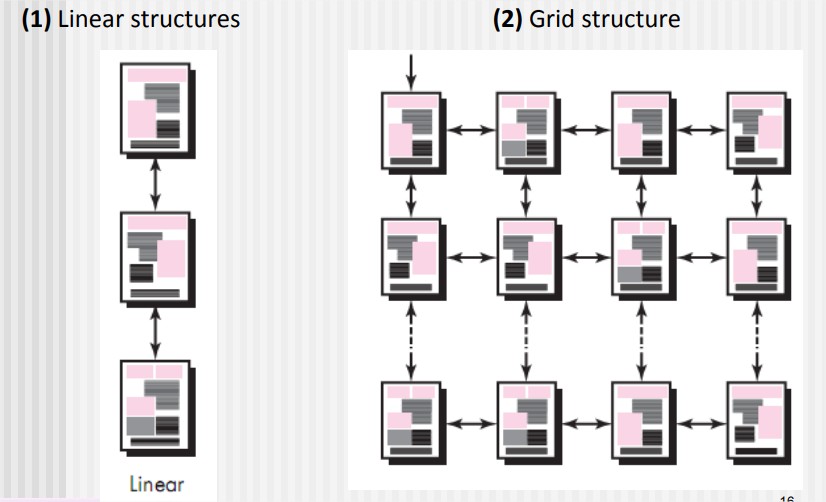
- Four different content structures :
- (1) Linear structures
- (2) Grid structure
- (3) Hierarchical structures
- (4) Networked or “pure web” structure
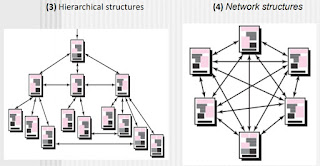
- WebApp architecture
- WebApp architecture describes an infrastructure that enables a Web-based system or application to achieve its business objectives.
- The Model-View-Controller (MVC) architecture is one of a number of suggested WebApp infrastructure models that decouple the user interface from the WebApp functionality and informational content.
Model-View-Controller (MVC) architecture
- Model :
- The model (sometimes referred to as the “model object”) contains all application-specific content and processing logic, including all content objects, access to external data/information sources, and all processing functionality that is application specific.
- View :
- The view contains all interface specific functions and enables the presentation of content and processing logic, including all content objects, access to external data/information sources, and all processing functionality required by the end user.
- Controller :
- The controller manages access to the model and the view and coordinates the flow of data between them.
Navigation Design
- Begins with a consideration of the user hierarchy and related use cases.
- Each actor may use the WebApp somewhat differently and therefore have different navigation requirements
- As each user interacts with the WebApp, it encounters a series of navigation semantic units (NSUs)
- NSU—“a set of information and related navigation structures that collaborate in the fulfillment of a subset of related user requirements”
Navigation Semantic Units
- Navigation semantic unit
- Ways of navigation (WoN)—represents the best navigation way or path for users with certain profiles to achieve their desired goal or sub-goal. Composed of …
- Navigation nodes (NN) connected by Navigation links
Navigation Syntax
- Individual navigation link—text-based links, icons, buttons and switches, and graphical metaphors..
- Horizontal navigation bar—lists major content or functional categories in a bar containing appropriate links.
- Vertical navigation column
- lists major content or functional categories
- lists virtually all major content objects within the WebApp.
- Sitemaps—provide an all-inclusive tab of contents for navigation to all content objects and functionality contained within the WebApp.
Component-Level Design
- WebApp components implement the following functionality
- Perform localized processing to generate content and navigation capability in a dynamic fashion
- Provide computation or data processing capability that are appropriate for the WebApp’s business domain
- Provide sophisticated database query and access
- Data interfaces with external corporate systems.
WebApp Design Goals
- Introduction :
- Jean Kaiser suggests a set of design goals that are applicable to virtually every WebApp regardless of application domain, size, or complexity.
- The following are the set of design goals to apply webApp
- Simplicity
- Consistency
- Identity
- Robustness
- Navigability
- Visual Appeal
- Compatibility
- Simplicity
- Content should be informative but to the point and should use a delivery mode (e.g., text, graphics, video, audio) that is appropriate to the information that is being delivered.
- Architecture should achieve WebApp objectives in the simplest possible manner.
- Navigation should be straightforward and navigation mechanisms should be naturally obvious to the end user.
- Functions should be easy to use and easier to understand.
- Consistency
- This design goal applies to virtually every element of the design model.
- Content should be constructed consistently
- e.g., text formatting and font styles should be the same across all text documents;
- Graphic art should have a consistent look, color scheme, and style)
- Identity
- Establish an “identity” that is appropriate for the business purpose.
- Robustness (Strength)
- The user expects robust content and functions that are relevant to the user’s needs.
- Navigability
- Navigation should be simple and consistent.
- It should also be designed in a manner that is predictable.
- The user should understand how to move about the WebApp without having to search for navigation links or instructions.
- Visual appeal
- The look and feel of content, interface layout, color coordination, the balance of text, graphics and other media, navigation mechanisms must appeal to end-users
- Compatibility
- WebApp will be used in a variety of environments (e.g., different hardware, Internet connection types, operating systems, browsers)
- It must be designed to be compatible with each.